Cortex
A native desktop client for language models that shows what every reply costs. Tauri v2 (a Rust shell) and React, on DeepInfra's hosted models or any model server you run yourself.
Quick start
Needs Rust (stable) and Node 22. On Linux, also the WebKitGTK development
libraries that .github/workflows/ci.yml installs.
npm ci
npx vite build           # first: the Rust build embeds the built interface
cargo test --workspace   # core logic, the provider against the stand-in, whole turns
npm test                 # Vitest: formatting, markdown safety, the store, the app renders
npm run typecheck        # tsc
npm run test:ui          # Playwright: the interface in Chromium, on sample data
npm run tauri dev        # the app, with hot reload
The end-to-end run drives the real app over WebDriver on Linux. It needs
webkit2gtk-driver, xvfb, dbus-x11 and cargo install tauri-driver, and a
debug build with the e2e feature first:
npx tauri build --debug --no-bundle --features e2e
scripts/e2e-linux.sh
CI also checks formatting and lints:
cargo fmt --all --check
cargo clippy --workspace --all-targets -- -D warnings
npm run format:check     # Prettier over src/ and e2e/
Why it exists
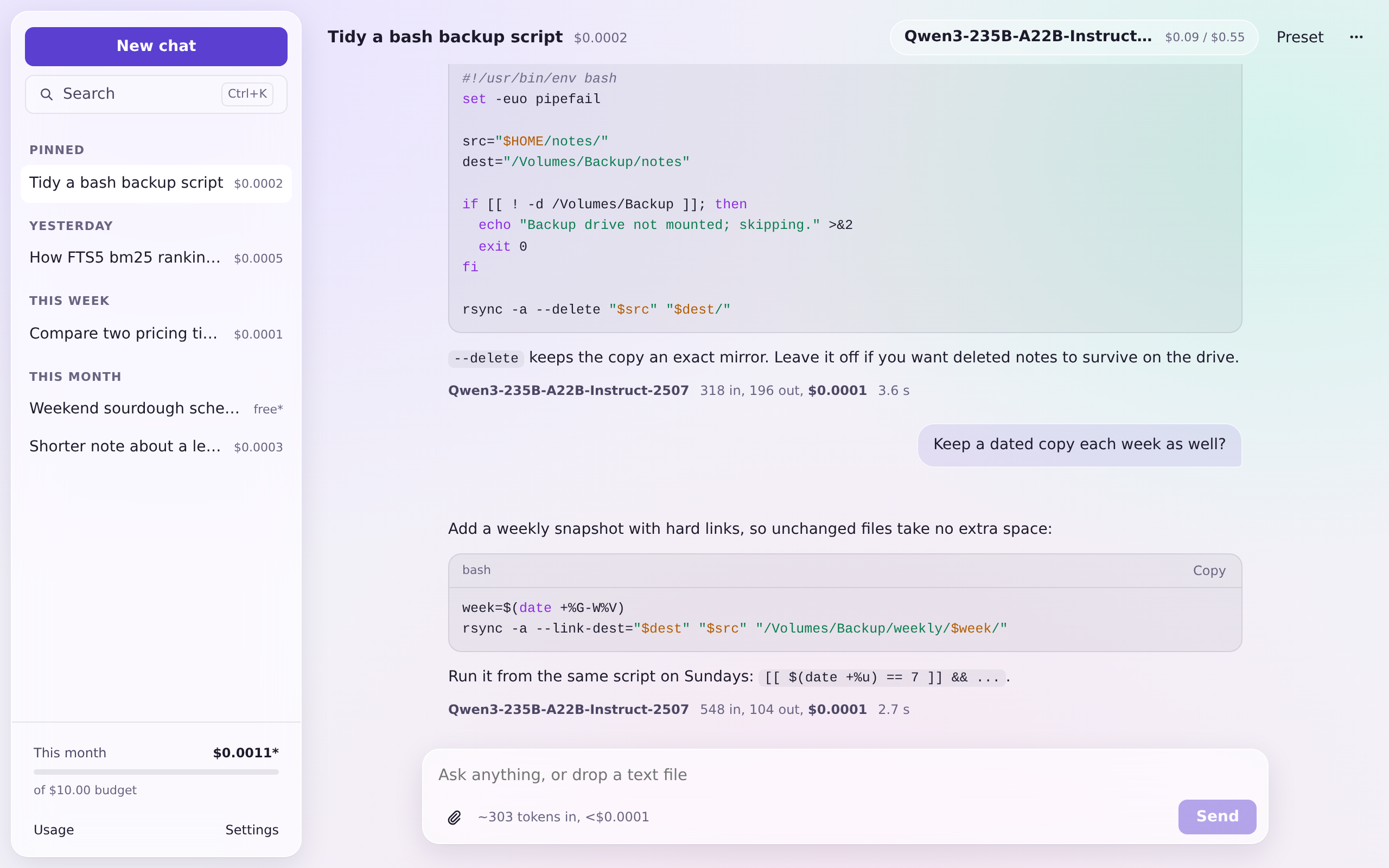
Hosted chat apps charge a flat monthly fee whether you ask one question or a thousand. Paying per token through an inference provider is usually far cheaper, but only if you can see what you are spending. Cortex puts the price of every reply in front of you: tokens in and out and the dollar cost under each answer, a running total per conversation, the month so far against a budget, and an estimate of what a prompt will cost before you send it.
How it is built
The logic lives in crates/cortex-core, a plain Rust library: the provider
client and its streaming parser, pricing and cost, SQLite storage with
full-text search, attachments and export. src-tauri holds the commands, the
windows, the tray and the shortcut. The React interface talks to it through
one typed interface, whose TypeScript types are generated from the Rust
structs. More in docs/architecture.md.
crates/cortex-core/   providers, streaming, pricing, cost, storage, export
crates/standin/       the test stand-in for DeepInfra and local servers
src-tauri/            the desktop shell: commands, windows, tray, shortcut
src/                  the React interface (main window and quick prompt)
e2e/                  Playwright (interface) and WebDriver (real app) tests
docs/                 architecture, cost accounting, the Mac checklist
What it does
- Streaming chat with any chat model on DeepInfra, or on a local server (Ollama, LM Studio, llama.cpp: anything OpenAI-compatible). Stop a reply at any point; what arrived is kept.
- A cost meter everywhere. Live per-model prices from DeepInfra, stored with each reply so history never changes. Estimates are labeled "est.". Local models cost nothing. See how cost is counted.
- A model picker with prices: search, filter by vision, reasoning, favorites or local, and see input and output price per million tokens and the context size before you choose.
- A quick prompt. Cmd+Shift+Space anywhere opens a small frosted prompt over whatever you are doing. Ask, read, press Esc. Cmd+Enter moves the conversation into the main window.
- Presets: saved system prompts (with an optional model and temperature), applied to a chat in one click.
- Search across every chat (full-text, as you type).
- Export to an Obsidian vault: a conversation as Markdown with frontmatter (models, tokens, cost), images copied beside it.
- Images and files: paste or drop an image for a vision model (it is downscaled first, since vision models bill by size), or a text file to read as context.
- macOS window materials: frosted panels over native vibrancy, light and dark, with a choice of material and panel tint, and a solid mode for when transparency gets in the way.
- Menu bar: this month's spend, a new chat or the quick prompt, from anywhere.
Screenshots
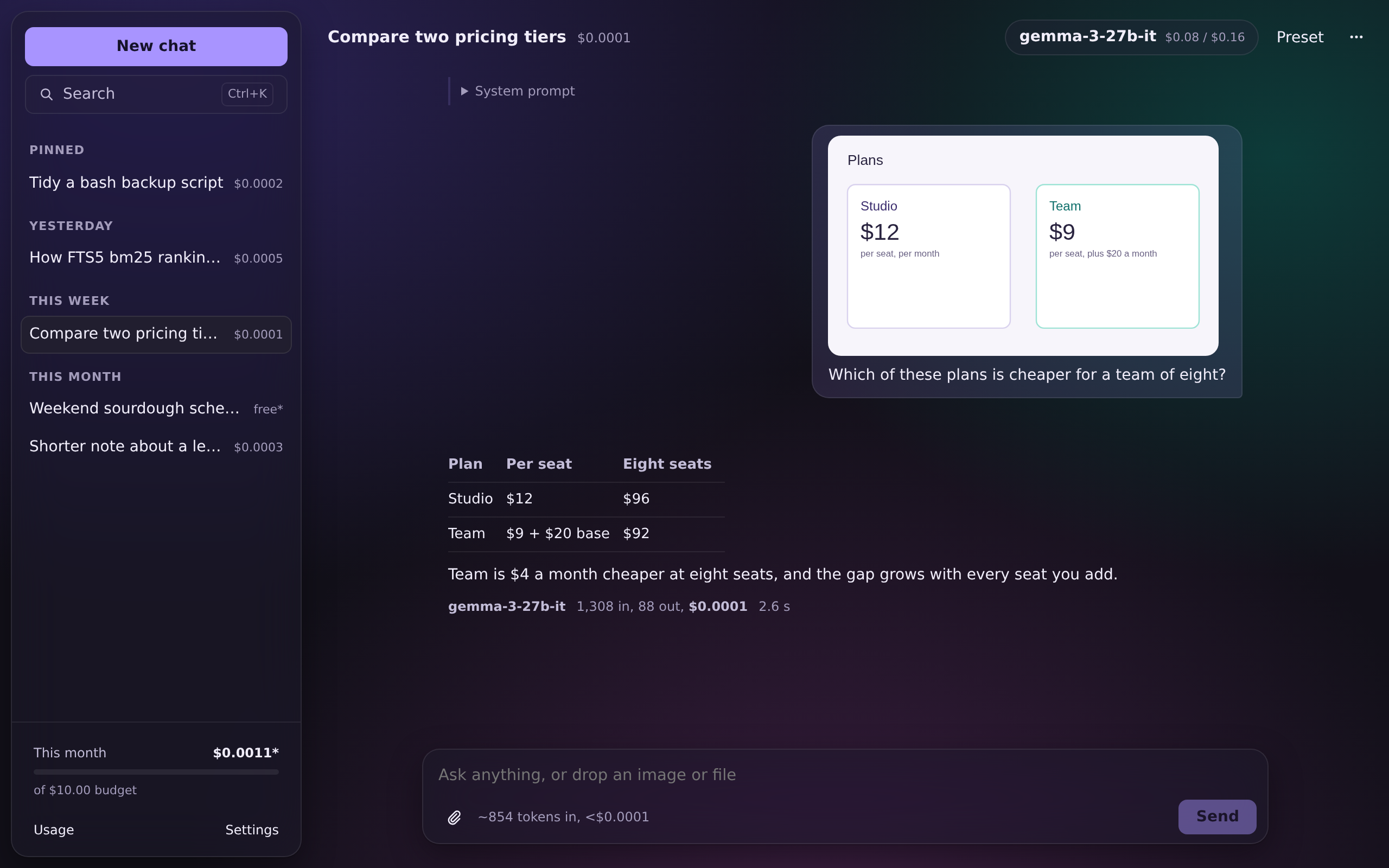
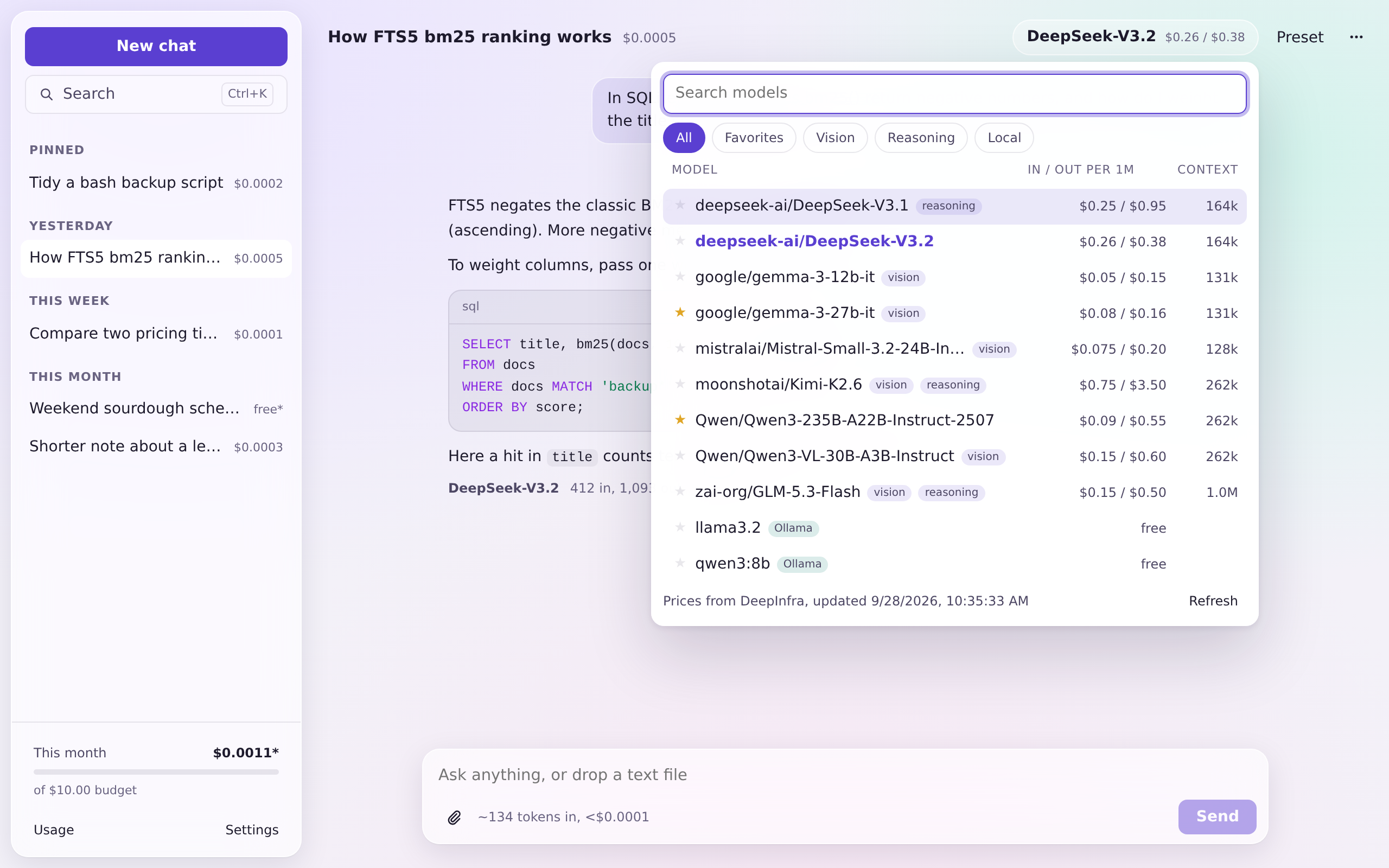
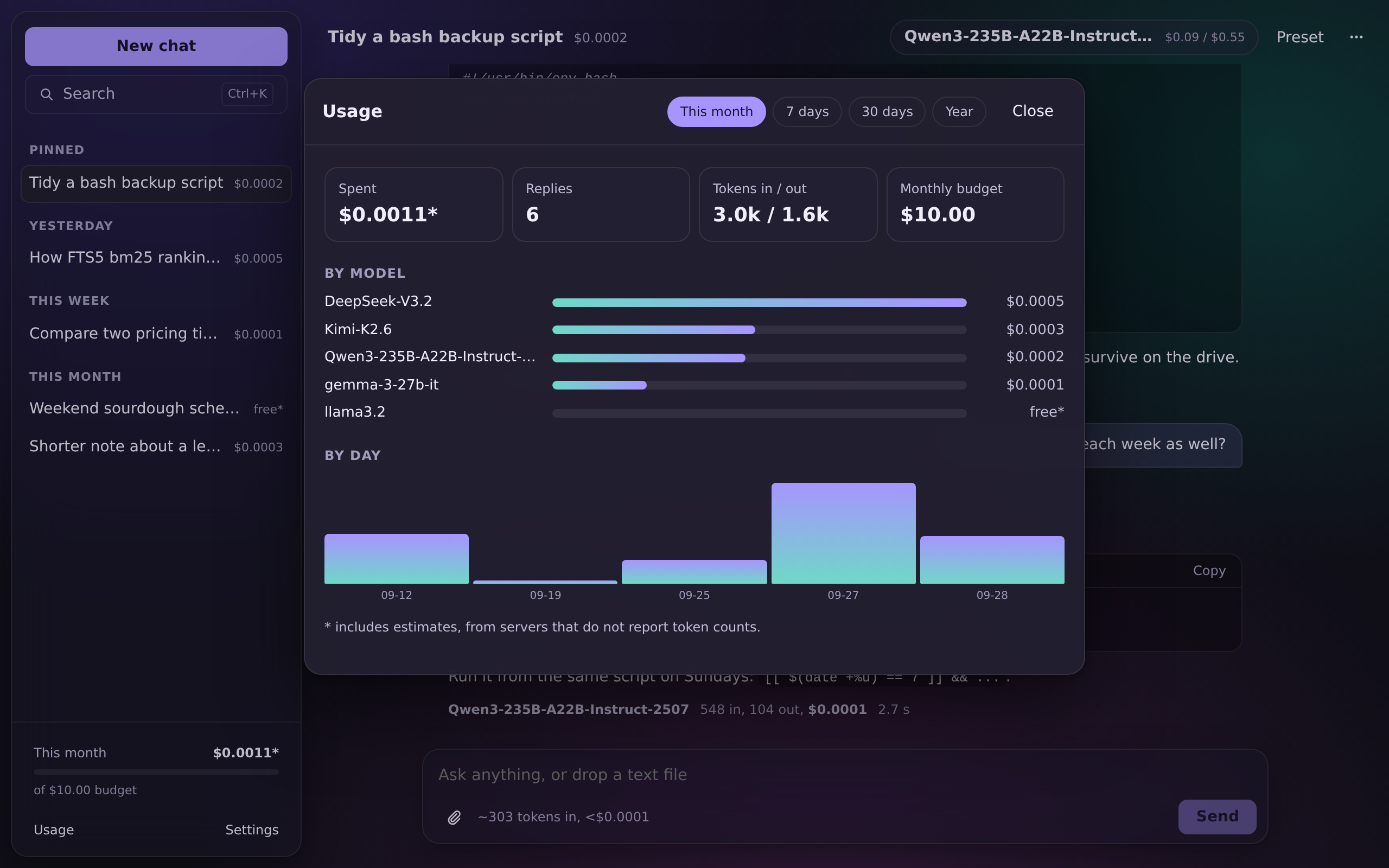
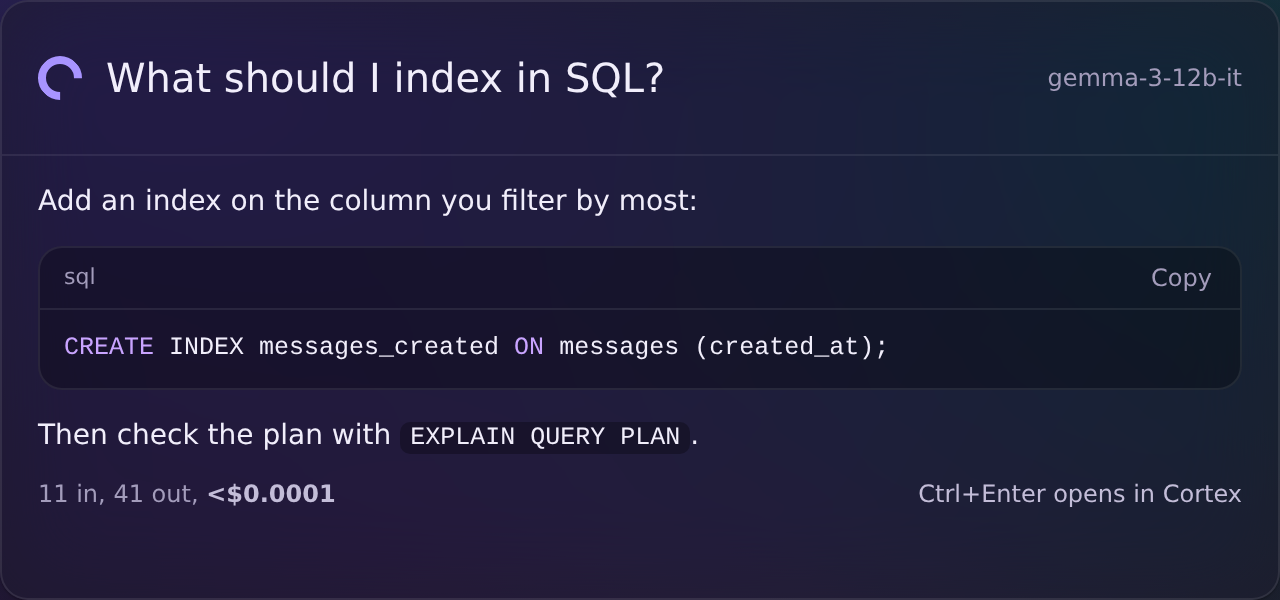
Screenshots are the interface on its built-in sample data (every chat in them is invented), shown over the backdrop the page paints when there is no native vibrancy. On a Mac the panels sit on the frosted desktop instead.
Privacy
- Chats, attachments and settings live in one SQLite file on your computer.
- API keys live in the macOS Keychain, never in the database or a file. The interface can set or remove a key but never read one back. A key is checked with the provider before it is stored, so a mistyped one is caught at once.
- The only network traffic is to the provider you chose, from the Rust side. The webview itself cannot reach the network (its content security policy allows none).
- No telemetry, no accounts, no update pings. With a local model, nothing leaves the machine at all.
Install
Build from source: after the Quick start, npm run tauri build makes a
release build (the .app and a .dmg on macOS). The build is ad-hoc signed,
not notarized, so macOS asks once: open System Settings, Privacy & Security,
and choose "Open Anyway". Then:
- Settings, DeepInfra: paste your API key (from deepinfra.com, Dashboard, API Keys).
- Optionally add a local server under Local servers (Ollama is
http://localhost:11434/v1). - Set a monthly budget if you want the warnings.
npm run dev serves the interface alone in a browser, on sample data.
Tests
The Rust tests run every provider path against crates/standin, a small
OpenAI-compatible server whose behavior is picked by model id: streaming with
usage, no usage, cached tokens, reasoning, images, errors before and during a
stream, and a slow reply for testing Stop (which checks that the server sees
the connection close). The Playwright run covers two window sizes in both
themes, the main flows, and an axe check for contrast and labels. The
end-to-end run starts the actual Tauri binary under a virtual display, points
it at the stand-in, and sends a message, stops one, searches, and exports a
note.
What needs a real key and a Mac (live prices, DeepInfra's usage reporting, vibrancy, the Keychain, the global shortcut) is a five-minute checklist in docs/verify-on-mac.md.
Keyboard
| Keys | Does |
|---|---|
| Cmd+Shift+Space | Quick prompt, from anywhere (changeable) |
| Cmd+N | New chat |
| Cmd+K | Search chats |
| Cmd+, | Settings |
| Enter / Shift+Enter | Send / new line |
| Esc | Stop the reply; close a panel |
| Cmd+Enter (quick prompt) | Continue in the main window |
Limitations
- No tool calling or agents: Cortex is for talking to a model, on purpose.
- macOS is the target. Linux builds and is tested (without vibrancy); Windows is not built.
- The quick prompt may not appear over full-screen apps on macOS.
- Token estimates for local servers are approximate, and marked as such.
- Prices come from DeepInfra's public model list, which is an extension to the OpenAI format rather than a documented contract; the dated offline copy is the fallback.
License
MIT.